
New
Quick Tour
The first time you open a page where Canopy adds tools, you can take a short balloon tour of those controls. Do not show again is remembered for that page. Press any key to move to the next stop.
Features
Canopy automatically formats names, dates, and places on Ancestry, so your family tree reflects the quality of your research. Then it checks the evidence: timeline rules, quality scores, kinship, census households, DNA lines, and ThruLines match counts.
Latest update — v2.86.40 · 10 October 2026
A short tour points out Canopy’s controls the first time you open a page. The profile badge reads the relationship under the name. Changing trees opens that tree’s home page so its index can load. ThruLines Gap Analysis compares spouse DNA match counts.
New
The first time you open a page where Canopy adds tools, you can take a short balloon tour of those controls. Do not show again is remembered for that page. Press any key to move to the next stop.
New
On a profile, Canopy reads the relationship under the name. A red blood drop is a blood relative. A numbered ladder is everyone else. Your own profile is drop 0. Reports and Prune Distant Branches still use Kinship Tier from the imported GED.
New
Choosing a different tree from the tree menu opens that tree’s home page so Canopy can load its index before scores, reports, or other tree tools. The tree you are already in stays put.
New
On a ThruLines page, Gap Analysis compares DNA match counts for married couples and saves a PDF. A husband and wife should be close. A large gap is a reason to check that couple in the tree.
What Canopy does
Works on merge pages, compare pages, and Edit Person sidebars. Format a single record or an entire family in one click.
First names become Proper Case. Surnames become ALL CAPS. Alternate names in parentheses are handled correctly. Suffixes are validated against an approved list.
Converts any date format to the genealogical standard: DD Mon YYYY. Handles qualifiers like Abt, Bef, Aft, and Between ranges.
Expands abbreviations and adds missing counties. US places use a database of over 164,000 entries and format to City, County, State, United States. Canadian places, including on ancestry.ca, format to Municipality, MRC or county, Province, Canada.
One click
Opens each family member’s Edit sidebar in sequence and formats all fields automatically — formatting an entire family without touching the keyboard.
Every change
Every change is recorded. Review what was formatted before saving, selectively undo individual fields, or download a full change report sorted by surname.
Local
Canopy runs entirely in your browser. Imported GED indexes and PDF reports stay on your device.
Proper case · (Nick) becomes "Nick"
ALL CAPS · alternates in (PARENS)
Approved list only; others removed
DD Mon YYYY · qualifiers preserved
City, County, State, United States
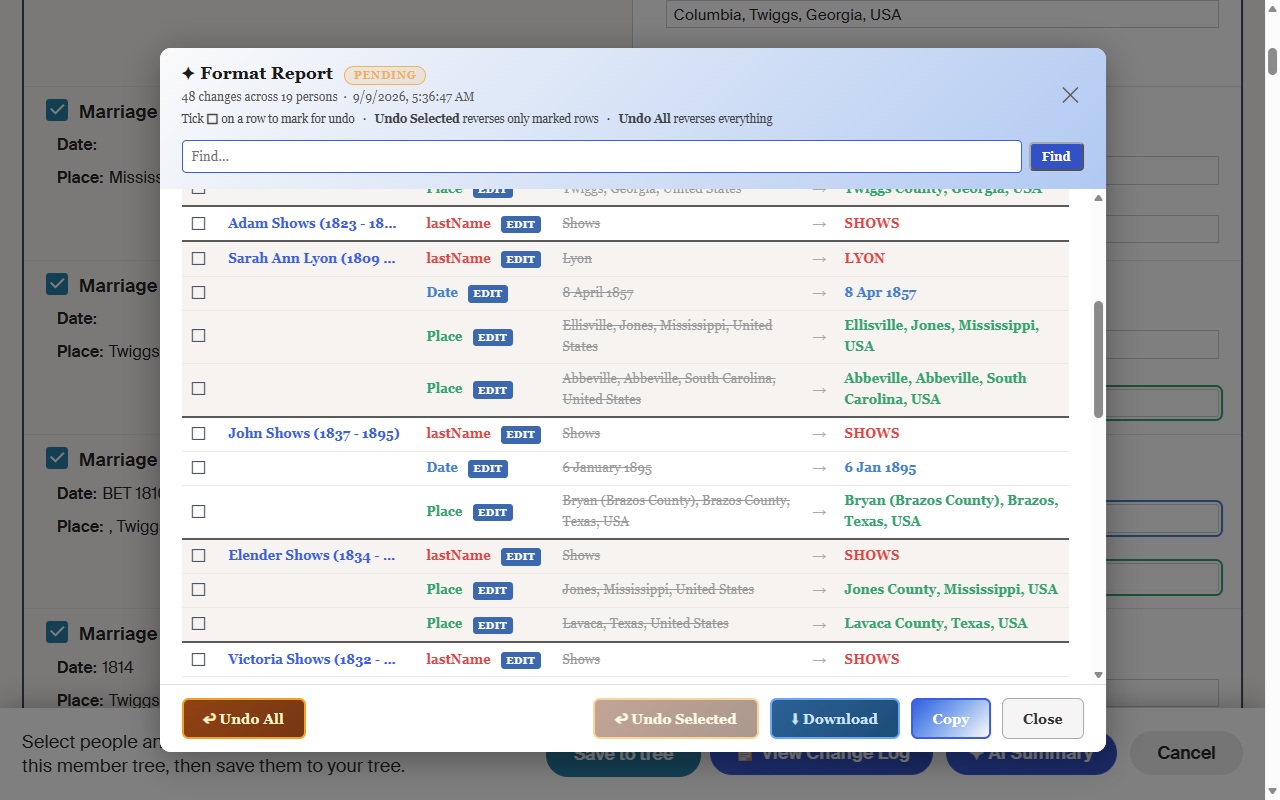
Format Report & Undo
After any formatting run, hover over a highlighted field to see the original value alongside the formatted value. Click Undo to restore that field only.
No change is permanent until you click Save. Cancel the sidebar at any time to discard all changes at once. On a merge page, Format & Save is the path that clicks Save to tree after you close the change log.
Where Canopy formats
Every formatting method respects your preferences, and every changed field can be undone one at a time from the popup that appears on hover.
Any page
One person at a time, on any page
Open the Edit Person sidebar for any individual. A ✦ Format button appears automatically in the sidebar footer. Click it to reformat every name, date, and place field; fields that change are highlighted with a coloured outline.
With Auto-format on open enabled in Preferences, the formatter runs the moment the sidebar opens — no button click needed.
Facts page
Format while editing individual facts
When the Edit Facts panel is open, a ✦ Format Fields button sits beside Save and Cancel. It formats every editable name, date, and place in the panel without leaving the edit view — vital facts and custom events alike.
Profile page
Check formatting before you save
When adding a new family member, a ✦ Check Format button appears beside Add and Cancel. Type the details as normal, then tidy casing, date format, and place structure in one step. Works in both New person and From your tree modes.
Merge & Compare page
Clean up fields before confirming a merge
Reformats the name, date, and place fields Ancestry will write to your tree — people already in the tree and people marked New during the review. The other tree’s suggestion column is left as shown. ✦ Format & Save formats, shows the change log, and saves when you close it.
Profile · Facts page
Focal person + all visible relatives
✦ Format Family in the profile toolbar opens the Edit Person sidebar for the focal individual and each visible parent, spouse, and child, formats every field, saves, and moves on. A live progress banner tracks the run, and Canopy refreshes the tab if Chrome shows a load-failure screen mid-run.
Pedigree tree · Horizontal mode
Multiple generations from the pedigree tree
A toolbar at the top centre of the Horizontal tree offers ✦ Format Ancestors. It formats the root person and every ancestor currently visible, opening, formatting, and saving each confirmed ancestor in turn. Empty slots and unconfirmed Potential hint matches are skipped.
All modes
Dates, names, and places across languages
Dates written in English, French, German, Dutch, Spanish, Italian, Portuguese, Latin, and other European languages convert to DD Mon YYYY. Historic and Latin country names are translated — Hispania → Spain, Francia → France, Helvetia → Switzerland, Hibernia → Ireland.
US place lookups use the 164,000-entry database to expand bare city or county names, with a
disambiguation prompt when a name exists in more than one state. Canadian places format to
Municipality, MRC or county, Province, Canada — for example Saint-Calixte, Montcalm,
Québec, Canada — and CA is never used, because that abbreviation is California.
English ancestry.ca pages are supported, and French field labels such as Naissance and
Décès are recognised.
Timeline analysis & data validation
Canopy reads the profile you are looking at, tests its dates against its family, and scores how complete and well-evidenced it is.
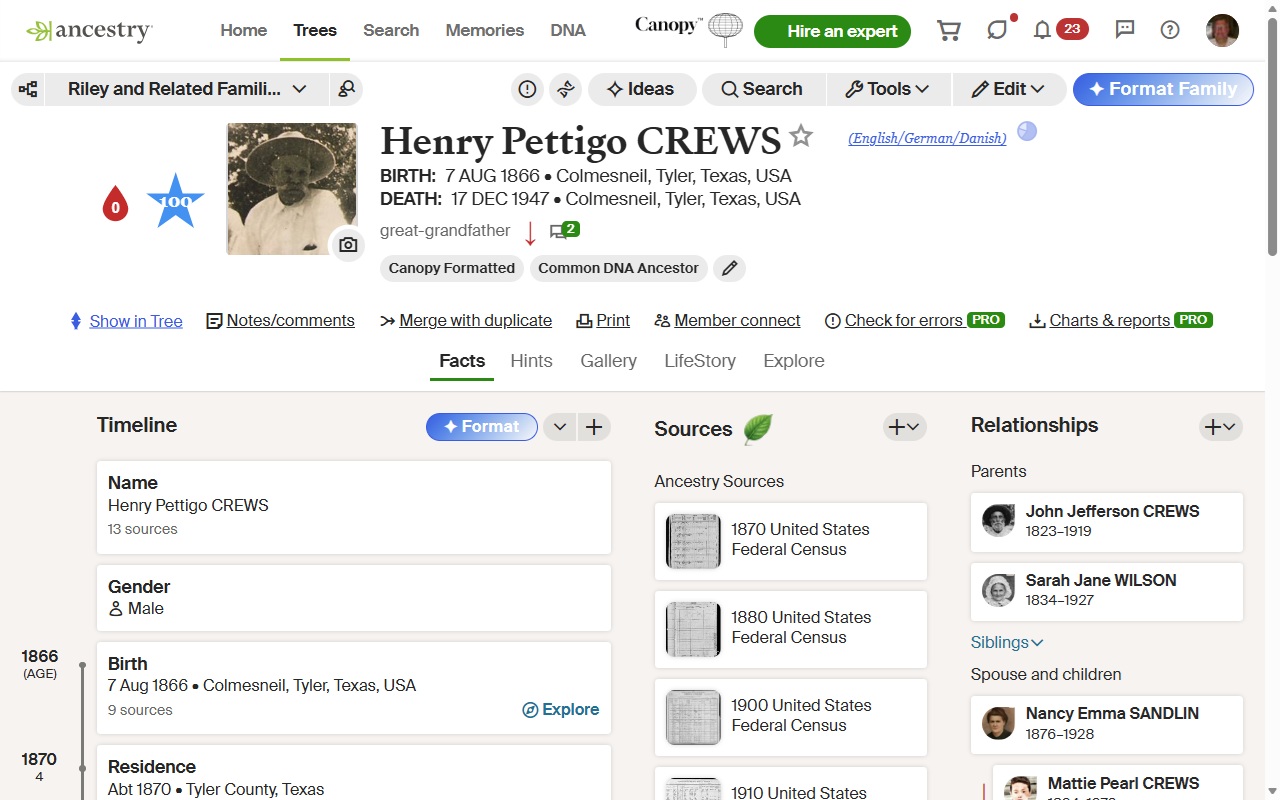
Profile page
Click ✦ Timeline Analysis on a profile and Canopy gathers the dated facts and family members’ birth and death years, then runs 19 checks in three groups. Issues appear in a collapsible panel, implicated fact cards are outlined in red, and a badge on the Explore tab shows the count at a glance.
| # | Severity | Condition flagged |
|---|---|---|
| Group A — Individual fact checks | ||
| 1 | Error | Death before birth — death year is earlier than birth year |
| 2 | Warn | Implausible lifespan — more than 120 years between birth and death |
| 3 | Warn | Event outside lifespan — any non-birth/death fact dated before birth or more than one year after death |
| 4 | Warn | Marriage before age 14 — calculated age at marriage is under 14 |
| 5 | Error | Conflicting birth years — two or more birth records show different years |
| 6 | Error | Conflicting death years — two or more death records show different years |
| 7 | Warn | Duplicate marriage entry — the same marriage label appears more than once in the same year (likely a double entry, not a remarriage) |
| 8 | Info | 3+ marriages within 15 years — unusually many marriages in a short span; may indicate merged identities |
| Group B — Family-based checks | ||
| 9 | Error | Born after parent’s death — person’s birth year is after mother’s death (or more than 1 year after father’s death) |
| 10 | Error Warn | Parent too young at birth — error if parent was under 12; warning if under 14 (applies to both mother and father) |
| 11 | Warn | Parent unusually old at birth — mother over 50 or father over 80 at the time of person’s birth |
| 12 | Error | Child born after person’s death — a listed child’s birth year is after the person died (1-year grace for posthumous birth when father) |
| 13 | Error Warn | Person too young at child’s birth — error if person was under 12; warning if under 14 |
| 14 | Warn | Person unusually old at child’s birth — person was over 80 at the time of the child’s birth |
| 15 | Warn | No marriage before spouse’s death — a listed spouse died before any recorded marriage year (flags when all marriages post-date the spouse’s death) |
| 16 | Error Warn | Spouse too young at marriage — error if spouse was under 12 at the latest recorded marriage; warning if under 14 |
| Group C — Location & record checks | ||
| 17 | Info | Child born before marriage — a listed child’s birth year predates all recorded marriages; shows how many years before the nearest marriage |
| 18 | Info | Residence vs. marriage location mismatch — a residence fact and a marriage fact within 15 years are in different countries (e.g. Texas residence 1880, Mexico marriage 1884) |
| 19 | Info | Multiple arrival/immigration records — two or more arrival, immigration, or emigration facts show different years; lists all years found |
Merge page
On a merge page Canopy runs a lighter check that compares the birth and death years shown for each candidate and flags obvious contradictions — death before birth, extreme lifespans. It runs automatically whenever Canopy processes the page.
When all is well, a green ✦ Vital stats OK toast confirms the check ran. When a contradiction is found, a small orange banner pinned to the bottom of the screen lists each issue.
Profile page
One-click search from a profile to Find A Grave and FamilySearch. On a Find A Grave memorial, save a local PDF of the page.
A magnifying glass at the end of the Birth and Death places opens a Google search in a new tab, and coming back to the Ancestry tab closes it.
The merge-page comparison star and the profile-page quality star share the same 0–100 range and the same colour scale, so a glance tells you roughly where a score falls.
Facts page
A small star in the badge row below the name scores how complete and well-evidenced the profile is, 0–100. Hover for the breakdown: birth and death date quality, source count, timeline events, and relationships.
Merge & Compare page
Your tree’s panel and the member tree’s panel are scored independently, with a filled star on each. Hover for the points.
| Birth date | 15 pts exact — 8 pts year-only |
| Birth place | 5 pts |
| Death date | 15 pts exact — 8 pts year-only |
| Death place | 5 pts |
| Father linked | 5 pts flat |
| Mother linked | 5 pts flat |
| Spouse | 8 pts flat if 1 or more found |
| Children | 1 pt each, capped at 10 |
| Sources | 1 pt each, capped at 15 |
| Records | 2 pts each, capped at 20 |
| Photos | 1 pt each, capped at 5 |
Shared scale
| 91–100 | Blue — excellent |
| 81–90 | Green — very good |
| 71–80 | Light green — good |
| 61–70 | Yellow — fair |
| 50–60 | Amber — weak |
| 25–49 | Violet — poor |
| 0–24 | Black — very poor |
Profile pages
Canopy reads the relationship Ancestry prints under the name and turns it into steps from you. Blood relatives get a red blood drop with the step count — a parent is 1, a grandparent is 2, a 5th great-grandparent is 7. Everyone else gets a pastel stairs pill: a spouse is 1, and a step or in-law adds a step.
| Blood drop — a blood relative | |
| 1 | Orange |
| 2 | Amber |
| 3 | Blue |
| 4 | Teal |
| 5 | Green |
| 6 | Deep green |
| 7+ | Slate — extended collateral kin |
A slate pill may read 7, 8, 9, or 99 — the value for people with no path at all to the bloodline, the same people listed in the No Kin of Mine report.
Facts page
After the profile name, Canopy shows the surname origin in parentheses — for example John Myers (Irish/English/German/Dutch). The first time a surname appears, Canopy reads Ancestry’s last-name meaning page and stores the ethnic labels only. Click a known origin to open that page, or Unknown to search Google.
Surname Origin Mix is the three-slice wheel beside the origin. With an imported GED, each ancestor surname origin votes through six generations, closer generations voting more; the first-listed origin on a surname is dominant (70/30, 60/20/20, 50/20/15/15). Groups under 1% combine as All Other, and Print saves the mix as a PDF.
Origin Lookup works through surnames not yet stored, checking each against Ancestry’s meaning page and saving the hits.
Profile page
On any open profile, Canopy marks your connection from the tree home person using a saved Relationship to Me path. Small red direction marks show which family cards sit on your link to the profile person.
Hover any mark for a short tooltip. Card marks can be turned off in Behavior.
Compare with Canopy — census matching
A Compare with Canopy button appears next to U.S. federal and Canadian census records — in the source-citation popup on a profile and on the “Does this match the person in your tree?” hint-review page. One click runs the comparison, draws a scored star, and relabels the button View Comparison. Turn on Auto Compare Census to run it as the page loads.
1850 and later
From 1850 each household row records a name and age. Canopy matches every row against your tree’s family roster — parents, spouse, siblings, and children — with a weighted score:
match = Name × 50% + Age × 30% + Gender × 20%
People not yet born or already deceased by the census year are excluded. Boarders, servants, and lodgers do not count as missing relatives, and leftover rows are hidden once every expected family member has a confident match.
Before 1850
Early schedules name only the head of household and tally everyone else in age-and-sex brackets. Canopy checks whether your family as a group lines up, blending four partial-credit signals equally:
| Total persons | Household grand total vs. total family size |
| Total males / females | Sex totals vs. expected, summed per sex |
| Under / over split | Family count split at a per-year age line vs. the household’s split |
| Per-bracket | Each individual bracket’s count vs. expected, averaged |
Canada
Canadian collections (1851–1931, plus the 1906/1916 Prairie censuses) use the same named-row score and never the U.S. bracket method. Country is read from the collection title, and the 1851 Census of Canada East/West is scored against 1852, when it was enumerated. English and French labels are recognised.
42,000+ names
When a row’s sex isn’t stated, Canopy infers it from the given name using U.S. Social Security birth-name records plus French and Canadian given names — roughly 42,000+ names across the 1880s–1970s, bucketed by decade and matched to the person’s estimated birth year.
Names resolved with 80% confidence or higher are used without asking; below that, Canopy queues a one-time Male / Female confirmation preset to its best guess.
Horizontal tree tools & ThruLines
In Horizontal view, a toolbar fixed to the top centre of the tree offers ✦ Format Ancestors, Origins, Canopy Scores, DNA lines, and score averages.
Pedigree tree · Horizontal mode
Appends each visible ancestor’s 0–100 quality score — same formula and colour scale as the profile star — after the birth/death line on each card. The anchor person shows a hollow star (☆); every other scored card a filled star (★).
The ▾ Score averages panel shows the overall mean, one average per generation from Gen 0 to Gen 4, and separate paternal and maternal averages.
Pedigree tree · Horizontal mode
Reads the unique surnames of the people on the tree, fetches Ancestry’s last-name meaning page for each one still Unknown — without opening Facts pages — and shows a compact four-column list of surname and origin. Click an origin to type labels such as English or English/Irish; they feed Surname Origin Mix.
Pedigree tree · Horizontal mode
The DNA lines ▾ dropdown outlines inheritance paths from the home person:
ThruLines
Gap Analysis builds a PDF of the married couples whose DNA match counts both appear on the ThruLines page you have open. A husband and wife share the descendants below them, so those counts should be the same or very close. The mismatch is the gap divided by the smaller count: a couple at 500 and 575 is a 15% mismatch.
Couples are listed only when both spouses have a match count. The report is a reason to check the tree. It is not proof that either person is or is not an ancestor.
| Rank | What it means |
|---|---|
| No DNA | Both spouses show 0 matches. |
| High | 25% or more. A count of 0 against any other count is 100% and is listed here. |
| Moderate | 10% up to 25%. |
| Low | Under 10%. |
| None | Both counts match, and the count is not zero. These couples appear in the summary table only. |
GedCom Tools
Download or import a GedCom for your tree. The index powers graph-distance badges, Report Writer, Relationship Finder, 33 reports, and Prune Distant Branches.
Resume GED Batch
Canopy menu
Format one family group at a time from the GED index
✦ Canopy › GedCom Tools › Family Formatting Tools › Format Families uses the tree’s imported index and skips people already tagged Canopy Formatted. Progress is remembered per file — processing Hillin.ged does not affect Cantu.ged — and the pointer advances after every saved profile, so an interruption loses at most one.
| First load | Shows total profiles and a Start button. |
| Partially processed | Shows N of Total processed (M remaining) with Resume → and Start Over. |
| All processed | Shows all N profiles already processed with Start Over. |
Choose 1, 10, 100, or All profiles for each session.
Canopy menu
Reviewed Old → New pairs for surnames or places
Scan the GED index for a surname or place spelling, uncheck rows to skip, then queue the people on the Format Families walker. An optional Report Writer PID file limits the run to exactly those people. Each profile is loaded, the old value is checked on the live page, and only mapped fields are saved — including residence, marriage, and burial fact cards for a places run.
Start asks you to type Go. Pause and Quit are on the progress bar, and a Bulk Replace Report with every before → after change opens at the end.
Canopy menu
Every field change, sorted and downloadable
After a batch or Fill Missing Genders run, Download Change Log lists every field reformatted, grouped by person and sorted alphabetically by surname:
JONES, Thomas Edward
  First Name: THOMAS EDWARD → Thomas Edward
  Last Name: jones → JONES
  Birth Date: jan 5 1923 → 5 Jan 1923
  Birth Place: houston, tx → Houston, Harris County,
               Texas, United States
The file is a plain .txt named Canopy_ChangeLog_YYYY-MM-DD.txt.
Licensed
Safely remove the outermost Kinship Tier group
Removes people who are not blood relatives and are several generations from any blood relative — for example, “the mother-in-law of your wife’s third cousin, once removed.”
Options
Every formatting method respects your preferences. Recommended settings come pre-selected; change any of them in Canopy’s Options page.
Surnames
Pairs Canopy treats as the same name — mainly names anglicised over generations: Lejeune ↔ Young, Schmidt ↔ Smith, Breathnach ↔ Walsh. Pairs are added in Preferences or learned during Format Family, and accented spellings such as Cantú ↔ Cantu match automatically.
Behavior
Auto-format sidebars, a Last Profile Visited banner, hint-photo capture, Auto Compare Census, auto-run Canopy Scores, path arrows, the lifespan and vital-stats validators, and the Canopy Formatted tag — each switched on or off to suit your workflow.
Theme
A grid of colour themes for Canopy’s own interface — Options, popup, menus, dialogs, reports, and panels. Pick whichever palette is easiest for you to read; Ancestry’s own page chrome is unchanged.
7-day free trial
Full formatting and seven sample reports for seven days, no credit card. Then $69.95 a year for everything.